Creating Compelling Music Videos on a Budget: A Guide for Independent Artists
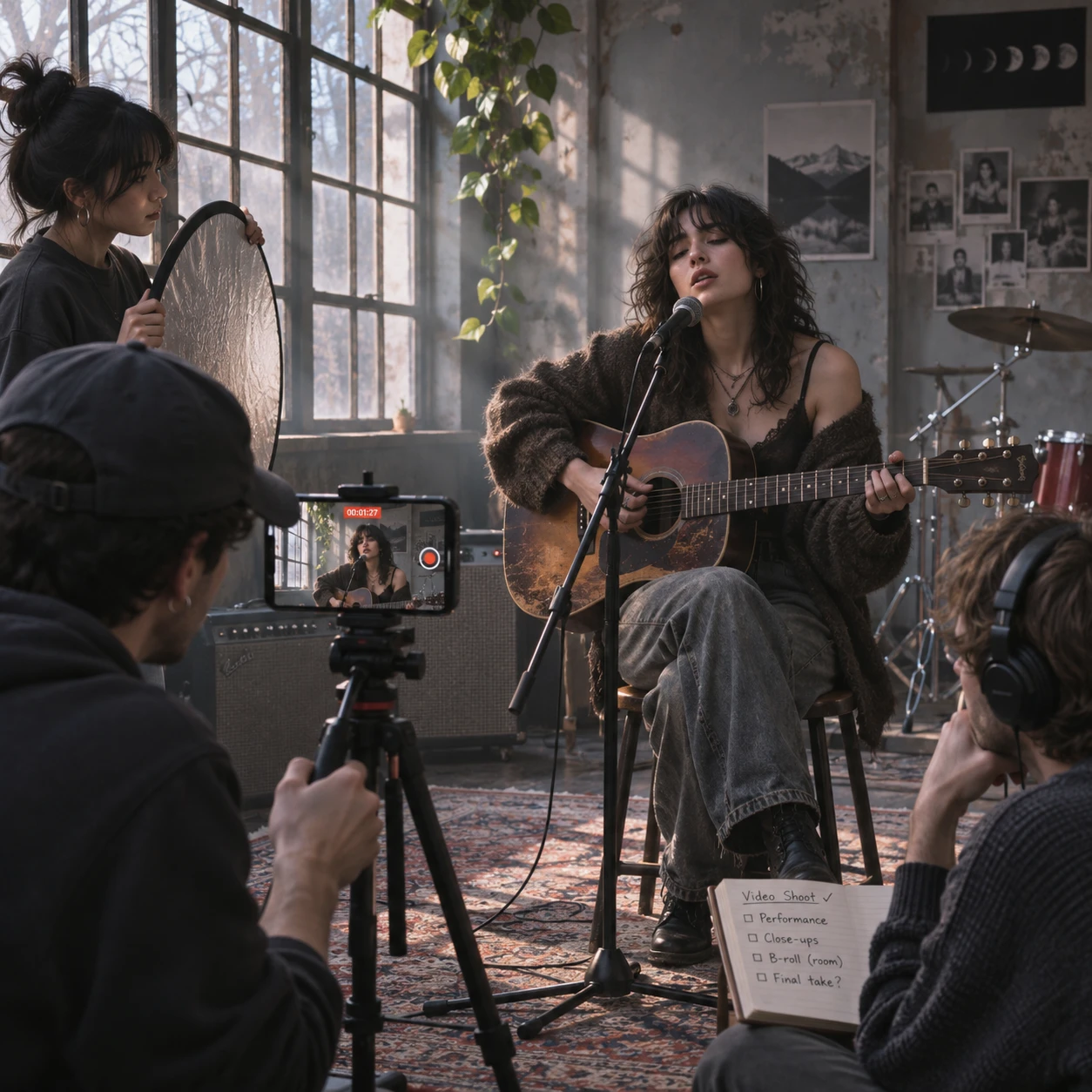
A compelling music video doesn’t depend on a cinema camera or a large production crew. For independent artists, the strongest results often come from a clear idea, careful preparation, and choices that support the song’s character. A focused production budget can go further when every location, shot, and edit serves the music.
Think of the video as part of the release itself: a visual expression of the artist’s identity that can also give an independent label useful material for promotion. Here’s how to plan and produce one without letting limited resources flatten the creative ambition.
Start with a clear concept, not expensive gear
A strong music video concept connects the song’s mood, lyrics, and artist identity through a simple visual idea. Define that idea before choosing equipment so every production decision has a purpose.
Listen to the track several times and note its emotional shifts, recurring images, and most memorable moments. Then write a one-sentence concept. For example: “A singer performs alone in a laundromat as the night shift slowly turns the space into a dream.” The idea gives the video a setting, a mood, and a visual change without requiring elaborate effects.
Turn the concept into a short creative brief that records:
- The song’s central feeling and the artist’s visual identity
- Whether the video is a performance, a narrative, or a blend
- Two or three recurring visual motifs, such as reflections, red fabric, or empty chairs
- The intended audience and the main release platform
A useful test: can you explain the video in a sentence and name three shots that express it? If not, simplify before spending money. A narrow idea can feel distinctive; a broad, vague brief tends to create extra locations, props, and shoot time.
Set a realistic budget and prioritize spending
A practical production budget covers the costs that protect the shoot and improve what viewers can see and hear. Set a firm total first, then reserve money for essentials before considering optional upgrades.
List likely expenses such as location fees, transport, food, props, storage, lighting, and any editor or specialist you need. Keep a contingency amount for problems such as a weather change or a replacement cable. Even a small buffer can prevent a minor setback from disrupting the day.
Prioritize in this order:
- Safety and permission: Confirm access, rules, and any costs before filming.
- Clear sound and playback: A music video usually uses the finished studio track, but reliable playback helps the artist perform in sync.
- Time and essentials: Budget for transport, food, batteries, memory cards, and backups.
- One visible improvement: If funds remain, spend on the element the concept needs most, such as a lighting rental or a colorist.
Choose spending by asking what viewers will notice. Renting a particular lens may matter less than securing a location that gives the video its identity. On the other hand, free equipment is not automatically economical if it is unreliable or unfamiliar. A small, tested kit can save time and protect the footage.
Find locations, props, and collaborators affordably
Low-cost locations, borrowed props, and a small trusted DIY production crew can give a music video character without the expense of a built set. Start with spaces you can access safely and legally, then make their existing details part of the concept.
Try a rehearsal room, a friend’s shop after closing, a community space, or a home with distinctive windows and textures. Ask the owner or manager directly about filming, timing, electricity, noise limits, and cleanup. A location that appears empty may still require permission, and public areas can have their own filming rules.
During location scouting, visit at the planned shooting time. Check how light enters the space, where power outlets are, what background noise you’ll hear, and whether there’s room for the camera and performers. Take reference photos and note a backup location in case access falls through.
Keep props selective. A single object with meaning can create a stronger visual thread than a room full of decorations. Ask bandmates, local artists, or label contacts for help with wardrobe, set dressing, or a second camera angle. Agree on roles and expectations in advance, including whether collaborators will be credited or paid.
A small crew works best when responsibilities are clear. One person can direct, another can operate the camera, and a third can manage playback and continuity. Combining jobs saves money, but avoid giving one person so many tasks that no one can watch for missed shots or technical problems.
Get more from simple equipment and available light
A smartphone camera can produce usable, engaging music-video footage when you control framing, focus, movement, and light. Test your phone and settings before the shoot; a simple setup is only an advantage if it works reliably.
Clean the lens, record at a consistent resolution and frame rate, and lock focus and exposure when your camera app allows it. Use the rear camera where practical, since it often offers better quality than the front-facing camera. Avoid digital zoom, which can make footage look soft. Move the phone closer instead, or use a lens attachment you have tested beforehand.
Natural lighting is a valuable resource, especially near a large window. Shoot when the light suits the concept, and watch how quickly it changes. A white reflector or foam board can bounce light onto a face; a dark cloth can reduce unwanted spill. If daylight is inconsistent, use a practical lamp or an affordable LED panel as a deliberate part of the look.
Keep the image steady with a tripod, a stable surface, or controlled handheld movement. Frame a few wide shots, medium shots, and close-ups so the editor has options. Choose the compromise consciously: a phone is affordable and familiar, but low light, rapid movement, and digital zoom can reveal its limits. If possible, test a short sample clip in the actual location before committing to the whole shoot.
Plan the shoot to save time and avoid reshoots
A shot list, schedule, and backup plan make a small music-video shoot more efficient. Prepare them before filming so the crew can focus on performance and coverage rather than deciding what to do next.
Break the song into sections, such as intro, verse, chorus, bridge, and outro. For each section, list the essential image and any alternate coverage. A chorus might need one full performance take, close-ups of the singer, and a detail shot that can help the edit build energy.
Organize the list by location and setup rather than simply following the song from start to finish. If all scenes use the same room and lighting, filming them together reduces setup changes. Schedule time for camera checks, playback tests, breaks, and a final review of the recorded clips.
- Bring a charged phone or camera, spare batteries, storage, chargers, and playback equipment.
- Record a short test and check focus, exposure, framing, and sound synchronization.
- Capture complete performances as well as individual moments; full takes provide useful editing options.
- Review key footage before leaving each setup, and back up files as soon as practical.
Plan around the biggest risk. For an outdoor shoot, that may be rain or changing daylight; for a borrowed interior, it may be a strict time limit. A simple contingency, such as a nearby covered spot, is more useful than an ambitious schedule with no room to adapt.
Edit for energy, clarity, and the song’s identity
Good video editing makes the images feel connected to the song’s structure, performance, and visual idea. Start with the strongest footage, then shape the pace around musical changes rather than adding effects to hide weak coverage.
Sync the footage to the final audio track and organize clips by scene or song section. Build a rough cut using complete performance takes first; then add close-ups, details, and narrative shots where they strengthen the story. A cut on a beat can add impact, but cutting on every beat becomes predictable. Let a held image breathe when the music calls for it.
Keep color, contrast, and image treatment consistent across shots. Basic exposure and white-balance corrections often matter more than flashy transitions. Use titles and visual effects sparingly, and check that any text is readable on a phone screen. If the video is intended for multiple platforms, protect important faces and text near the center of the frame so crops are less likely to remove them.
Before export, watch the whole video on a phone and a larger screen. Check synchronization, abrupt exposure changes, accidental black frames, and the opening seconds. Export a clean master and keep a copy of the project and source files. An ambitious edit can add polish, but complicated effects take time and may distract from a strong performance or concept.
Release and promote the video strategically
Strategic music-video promotion connects the release date, video, and independent label’s wider campaign. Prepare the assets and publishing details early so the video supports the song instead of appearing as an isolated upload.
Coordinate the premiere with the track’s release plan. Confirm the final title, artist credits, description, thumbnail, captions, and links before publishing. If the label is pitching the release to press, radio, playlists, or partners, make sure everyone has the correct date and approved artwork. A video can reinforce a campaign, but it cannot guarantee coverage or audience growth.
Make a few short vertical clips from footage you already have, such as a performance moment, a visual reveal, or a behind-the-scenes detail. Use versions that fit each platform’s format, and direct viewers to the full video or song where appropriate. Keep clips visually consistent with the main release so they feel like parts of one campaign.
Coordinate with collaborators on credits, posting times, and approved excerpts. After release, watch for audience responses and note which moments people share or discuss. That information can guide future videos, but treat early engagement as feedback rather than a verdict on the song or artist.
For independent artists, a budget-friendly music video succeeds when it makes a deliberate visual promise and keeps it. Start with the song, plan around the resources you have, and give each shot a reason to be there.